SnipSnapp
Free + $19.99 lifetime Pro · Mac, iPhone, iPad · Disclosure: this is our app
SnipSnapp is a clipboard manager built around AI transforms. Copy text or code, then summarize, translate, rewrite, explain, or refactor it — all on-device via Apple Intelligence, no API key needed. Pro adds bring-your-own-key cloud AI (Anthropic, OpenAI, Google, xAI, OpenRouter), iCloud sync, and cross-device relay.
Auto-detects 21 programming languages, URLs, emails, phone numbers, hex colors, and more. Search with full text or regex. Quick Search window (⌘⌥V) works like Spotlight for your clipboard.
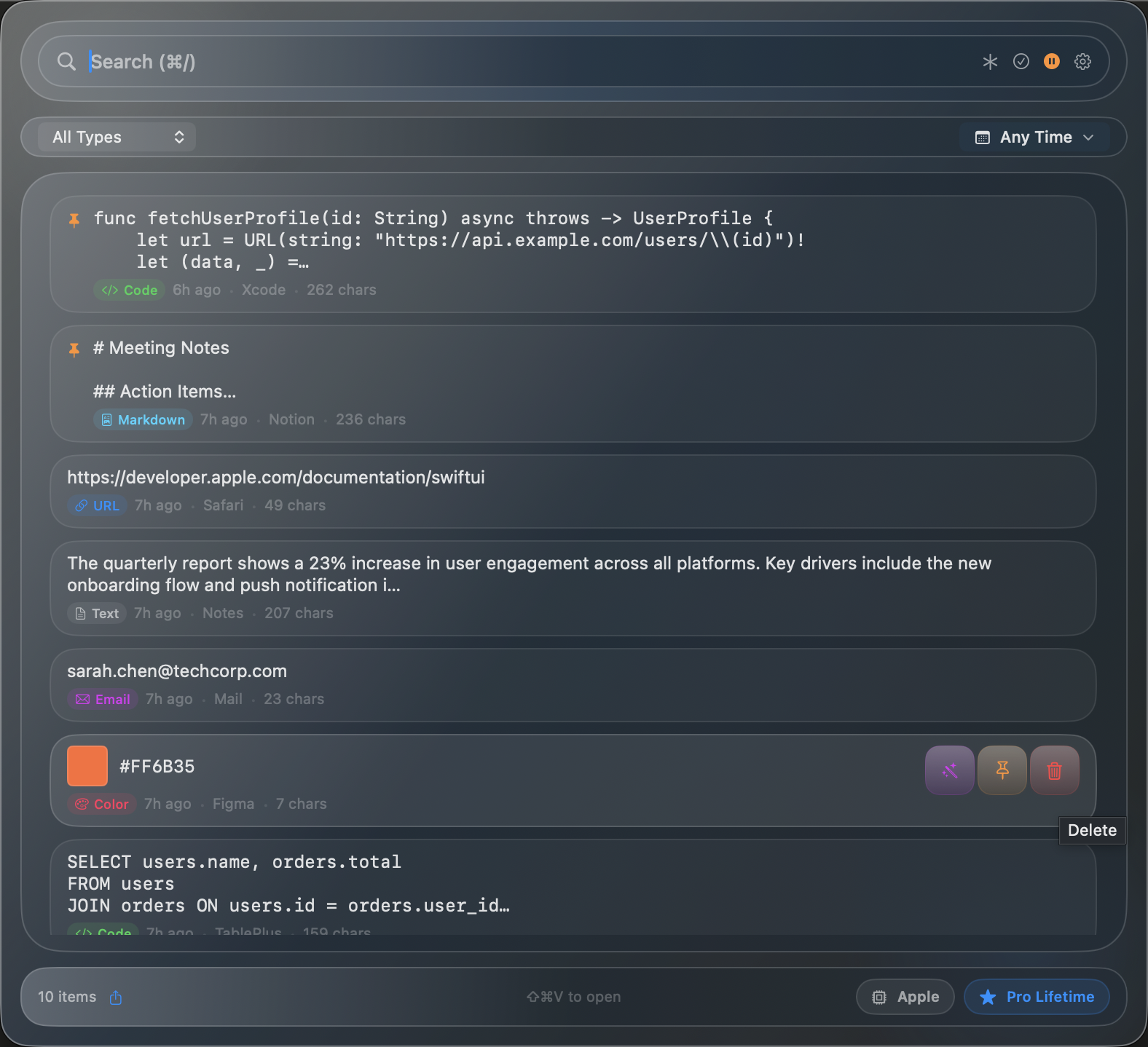
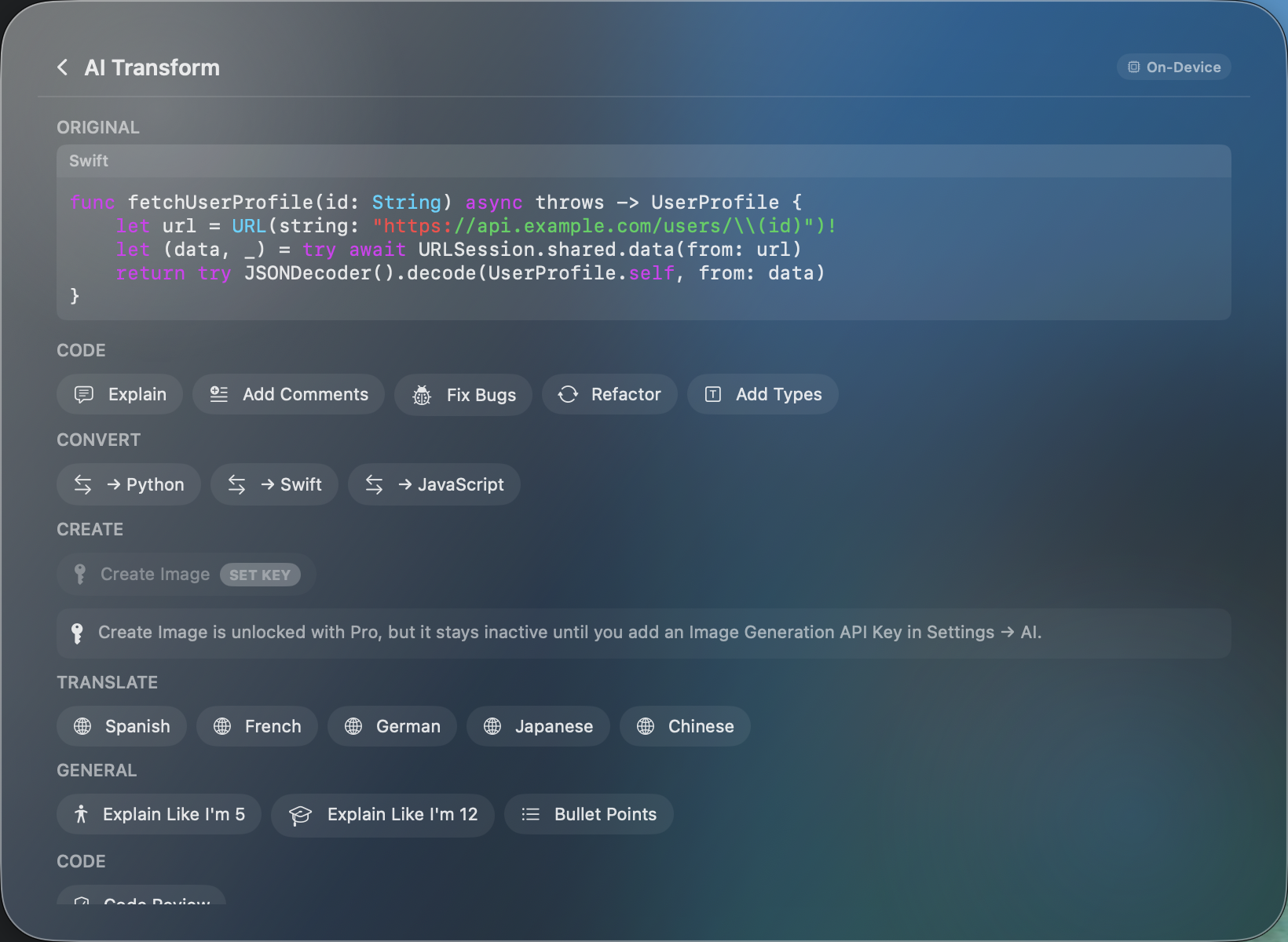
Strengths: AI transforms (free on-device), code detection, keyboard-driven, lifetime pricing, cross-platform.
Weaknesses: Newer app with a smaller user base. Closed source. No team/sharing features. On-device AI requires Apple Silicon + macOS 26.
SnipSnapp vs Paste → | SnipSnapp vs Maccy →Paste
$29.99/year or $2.49/month · Mac, iPhone, iPad
Paste is a visual clipboard manager for Mac. It presents your clipboard history as a scrollable filmstrip of rich previews — oriented toward images, links, and mixed content. Paste 6 (September 2025) added Apple Intelligence integration for OCR search across image clips.
Shared Pinboards let small teams share curated clip collections, which is unique in this category. iCloud sync works across Mac, iPhone, and iPad. Also available through Setapp.
Strengths: Visual UI, OCR search, team sharing (Pinboards), cross-platform, established track record.
Weaknesses: Subscription pricing ($30/year adds up). No active AI text transforms. Closed source.
Maccy
Free (open source, MIT) · Mac only
Maccy keeps your clipboard history and lets you access it fast. Open source, lightweight, minimal UI, fuzzy search. It's the simplest option in this list.
Respects password manager clipboard clearing. Customizable via preferences and Shortcuts actions. Native macOS UI.
Strengths: Free, open source, extremely lightweight, fast, privacy-respecting.
Weaknesses: Mac only. No sync. No AI. No content detection. No mobile companion. Minimal by design — if you outgrow it, you need a different tool.
Raycast
Free / $8/month Pro · Mac only
Raycast is a launcher (Spotlight replacement) that includes clipboard history as one of many features. If you already use Raycast as your launcher, its built-in clipboard manager is solid and you may not need a separate app. Free tier keeps 3 months of history; Pro extends that and adds Raycast AI.
Strengths: Already part of your workflow if you use Raycast. Fast. Extensible with plugins.
Weaknesses: Clipboard is a secondary feature, not the focus. Pro subscription ($8/mo) is steep if you only want clipboard history. Mac only. Free tier limits history to 3 months.
Alfred
Free / £34 Powerpack (one-time) · Mac only
Like Raycast, Alfred is a launcher that includes clipboard history as part of its Powerpack upgrade. If you're an Alfred user, the clipboard feature is capable — full-text search, snippets, merge clips. Not a reason to buy Alfred on its own, but a solid add-on if you already use it.
Strengths: One-time purchase. Deep automation with workflows. Established, mature app.
Weaknesses: Clipboard requires Powerpack (£34). No AI features. No sync. Mac only. UI feels dated compared to newer tools.
Pastebot
$12.99 one-time · Mac only
Pastebot by Tapbots (makers of Tweetbot/Ivory) is a clipboard manager with custom filters and text transforms. Supports iCloud sync between Macs (not iOS). Stores up to 1,000 clips. The sequential paste feature lets you paste multiple items in order.
Strengths: One-time price, custom text filters, sequential paste, Mac-to-Mac iCloud sync.
Weaknesses: Mac only (no iPhone/iPad app). No AI transforms. Text filters are manual, not AI-powered. Smaller development team.
CopyClip 2
$7.99 one-time · Mac only
CopyClip is a simple, affordable clipboard manager that sits in your menu bar. Stores up to 1,000 clips, supports drag-and-drop, and has basic search. No AI, no sync, no mobile. It does the basics well for a low price.
Strengths: Cheap, simple, does the basics.
Weaknesses: No AI. No sync. No mobile. Limited search. Doesn't stand out in any specific area.